一模四能:从看图到发文,Ming-flash-omni 打通全模态创作闭环
如果你需要模型既能看懂照片里哪里有路人抢镜,又能自己动手把人修掉,还能自己打分判断修得好不好,最后写一段推文介绍自己的作品——你需要几个模型?答案是:一个就够了。
1. 一张旅行照片的全自动进化之旅
你拍了一组华山的照片,准备发社交媒体。但照片里有些遗憾:前景有游客抢镜,远处有铁栏杆碍眼,整体色调也平淡了些。
传统做法:打开 Photoshop,花半小时逐张修图,再想文案。
而现在,你只需要把照片丢进一个文件夹,告诉 Agent 优化图片,或者执行一条命令:python3campaign.py run
几分钟后,文件夹里多了对比图、GIF 展示动图,和一段写好的推文文案。全程零人工干预。
这背后不是一套复杂的多模型编排系统,而是一个 Omni 全模态模型——Ming-flash-omni-2.0——同时扮演了四种截然不同的角色。
四位一体:一个模型的四种人格
这个项目最值得深入理解的一点是:完成整条流水线的理解、编辑、评价、写作四项任务,用的是同一个模型、同一套 API,区别仅在于 Prompt 和一个输出参数。

传统方案要实现同样的能力,至少需要:四个模型、四套推理服务、四种数据格式。
- 一个目标检测模型(识别干扰物)
- 一个图像修复/编辑模型(inpaint + 风格迁移)
- 一个图像质量评估模型(IQA)
- 一个语言模型(写文案)
而 Omni 模型的”全模态”能力,让这一切收敛到同一个 API 调用,只需切换 response_modalities 参数:
理解模式:输出文字(用于分析、评分)
config=types.GenerateContentConfig(response_modalities=["TEXT"]) 编辑模式:输出图片(用于生图、修图)
config=types.GenerateContentConfig(response_modalities=["TEXT", "IMAGE"])一参之差,能力切换。这就是”全模态”三个字的技术含义。
全流程深度拆解
完整流程图
下面是整个图片处理流水线的系统架构流转图:
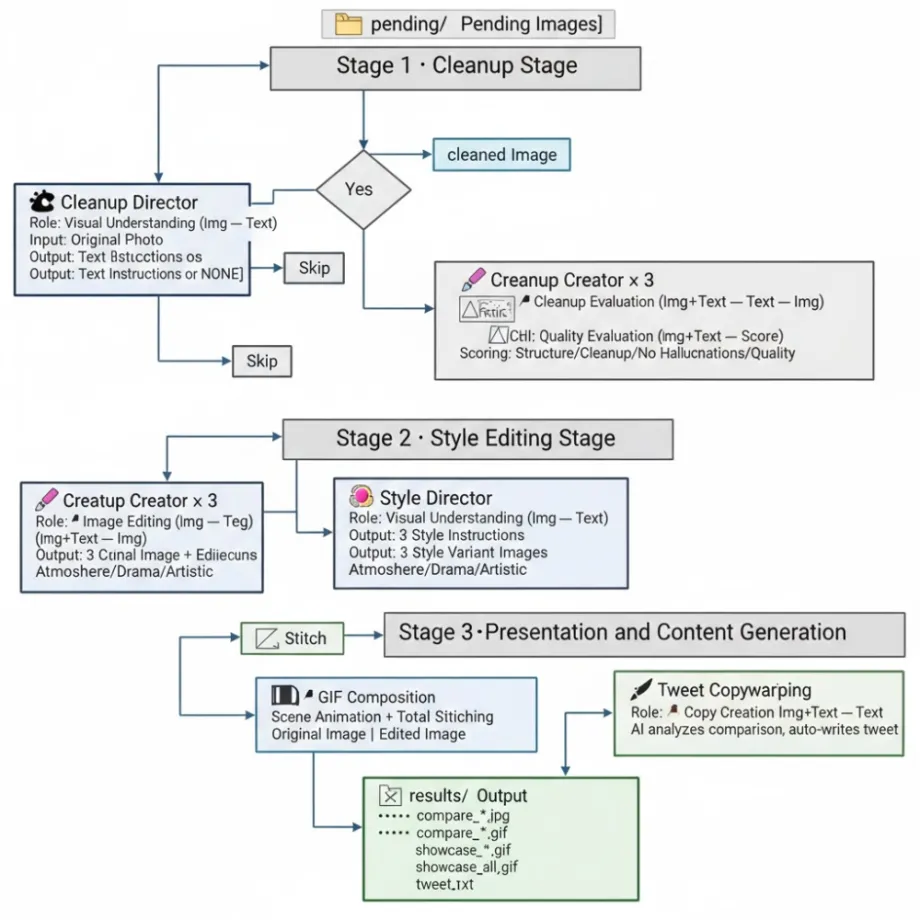
角色一:视觉理解——AI “看出”问题所在
analyze_cleanup() 让模型扮演专业修图师,扫描全图找干扰物:
resp = client.models.generate_content(
  model="inclusionai/ming-flash-omni-2.0",
  contents=[
    types.Part.from_bytes(data=image_data, mime_type="image/jpeg"),
    "You are an expert photo retoucher. "
    "Scan the ENTIRE image — foreground, midground, background, edges, corners.\n"
    "Look for: People, vehicles, barriers, traffic signs, wires...\n"
    "DO NOT list: lanterns, cultural ornaments, mountains, trees...\n"
    "Return ONE cleanup instruction or NONE."],
    config=types.GenerateContentConfig(response_modalities=["TEXT"]))
角色二:图片编辑——AI “动手”修图
注意 response_modalities = [“TEXT”, “IMAGE”]——这就是从”理解模式”切换到”编辑模式”的唯一区别。模型接收一张图和一段文字指令,直接输出编辑后的新图片。
角色三:质量评价——AI “审视”自己的作品
AI 生图有一个众所周知的问题:同样的指令,每次生成质量参差不齐。系统的解决方案是”生成多个,让 AI 自己挑最好的”。
角色四:文案创作——AI 为自己的作品写推文
最后一步,模型再次切换角色,变成社媒文案写手,根据对比图自动识别场景。
4. 从单点能力到自主 Agent:Skill 封装与接入
将完整流水线封装为一个 Skill
在 OpenClaw Agent 框架中,我们将整条自主图片编辑流水线封装为一个 Skill——auto-twitter-campaign:
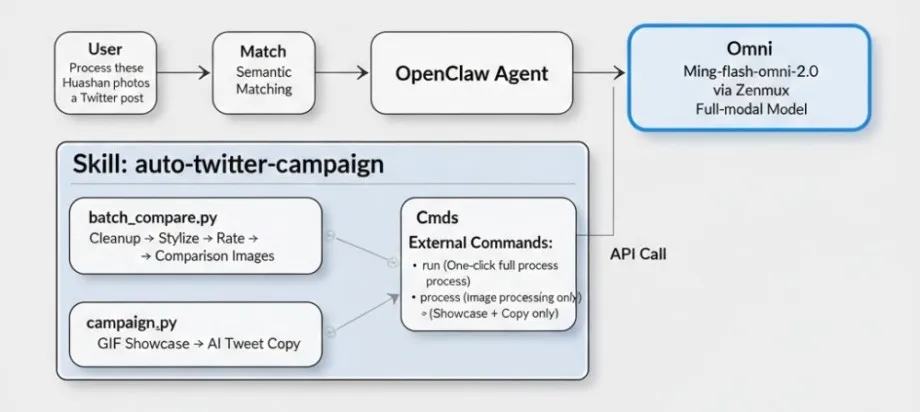
Skill 是怎么被 Agent 发现和调用的?
每个 Skill 通过一个 SKILL.md 文件自描述,Agent 通过它理解何时、如何调用。这意味着模型的全模态能力被封装进一个自描述的 Skill,Agent 按需调用,用户只需说一句话。
---
name: auto-twitter-campaign
description: Autonomous AI image campaign content generator. Processes pending photos via Ming-flash-omni-2.0 (cleanup + style editing), creates side-by-side comparison images and GIF showcases, then auto-generates tweet text using AI. Use for requests like "run campaign", "process pending images", "generate tweet content", or "create showcase from results".
---
# Auto Twitter Campaign — Content Generator
Autonomous closed-loop image editing and tweet content generation pipeline.
No auto-posting — outputs ready-to-use tweet text + media files.
## Quick Start
# Full pipeline: process pending images → comparisons → GIFs → tweet textpython3 {baseDir}/scripts/campaign.py run
# Process pending images only (cleanup + style editing → comparison images)python3 {baseDir}/scripts/campaign.py process
# Generate showcase GIFs + tweet text from existing comparison images in results/python3 {baseDir}/scripts/campaign.py showcase
# Process a specific imagepython3 {baseDir}/scripts/campaign.py process --image /path/to/photo.jpg
# Provide a scene description for better tweet text (otherwise AI auto-describes)python3 {baseDir}/scripts/campaign.py showcase --description "大年初一华山,下棋亭、西峰和南峰"
## Requirements
- `ZENMUX_API_KEY` environment variable set
- `google-genai` and `Pillow` Python packages
## Directories
- Pending images: `~/campaign_images/pending/`
- Candidates (intermediate edits): `~/campaign_images/candidates/`
- Results (comparisons, GIFs, tweet text): `~/campaign_images/results/`
## Pipeline
1. **Cleanup Director** — Vision scans for distractions (tourists, vehicles, clutter), generates cleanup instruction
2. **Cleanup Creator** — Generates multiple cleanup candidates, critic picks the best
3. **Style Director** — Generates 3 style instructions (atmosphere, dramatic, artistic)
4. **Style Creator** — Applies each style to the cleaned image, saves comparison images
5. **Showcase** — Creates per-scene and all-in-one GIF showcases from comparison images
6. **Tweet Writer** — AI analyzes comparison images + description, generates concise tweet text
## Output
After running, `~/campaign_images/results/` will contain:
- `compare_*.jpg` — Side-by-side comparison images (original | edited)
- `compare_*.gif` — Per-scene animated GIFs cycling through style variants
- `showcase_all.gif` — Combined showcase GIF of all comparisons
- `tweet.txt` — AI-generated tweet text ready to copy-paste
- `description.txt` — Scene description (user-provided or auto-generated)
5. 全模态模型对 AI 应用架构的启示
回顾整个项目,这背后有几个值得思考的趋势:
**1. 从”多模型编排”到”单模型多角色”:**架构复杂度大幅降低。
**2. 语义与像素的闭环:**理解与生成的深度耦合。在 Omni 架构中,理解(Director)与生成(Creator)不再是两个独立的环节,而是同一个语义空间的两种表达方式。模型能“深刻读懂”华山的险峻(语义理解),本质上是在构建修图所需的空间逻辑;它在修图时能精准补全背景(像素生成),则是对这种语义逻辑的视觉兑现。这种“知行合一”的能力,让 AI 从简单的绘图工具演变为具有认知能力的创作主体。
**3. “自我评价”能力让 Agent 闭环成为可能:**模型能评价自己的作品,使得自主挑选最佳的闭环成立。
**4. Skill 封装让模型能力流动起来:**从”能力”变成”服务”,变成可复用的积木。
本文涉及的项目基于 Ming-flash-omni-2.0 全模态模型,通过 Zenmux (https://zenmux.ai/inclusionai/ming-flash-omni-2.0 ) API 调用,Skill 接入基于 OpenClaw Agent 框架。完整代码包含在 scripts/batch_compare.py 和 scripts/campaign.py 中。
6. 真实效果
Day1: 华山
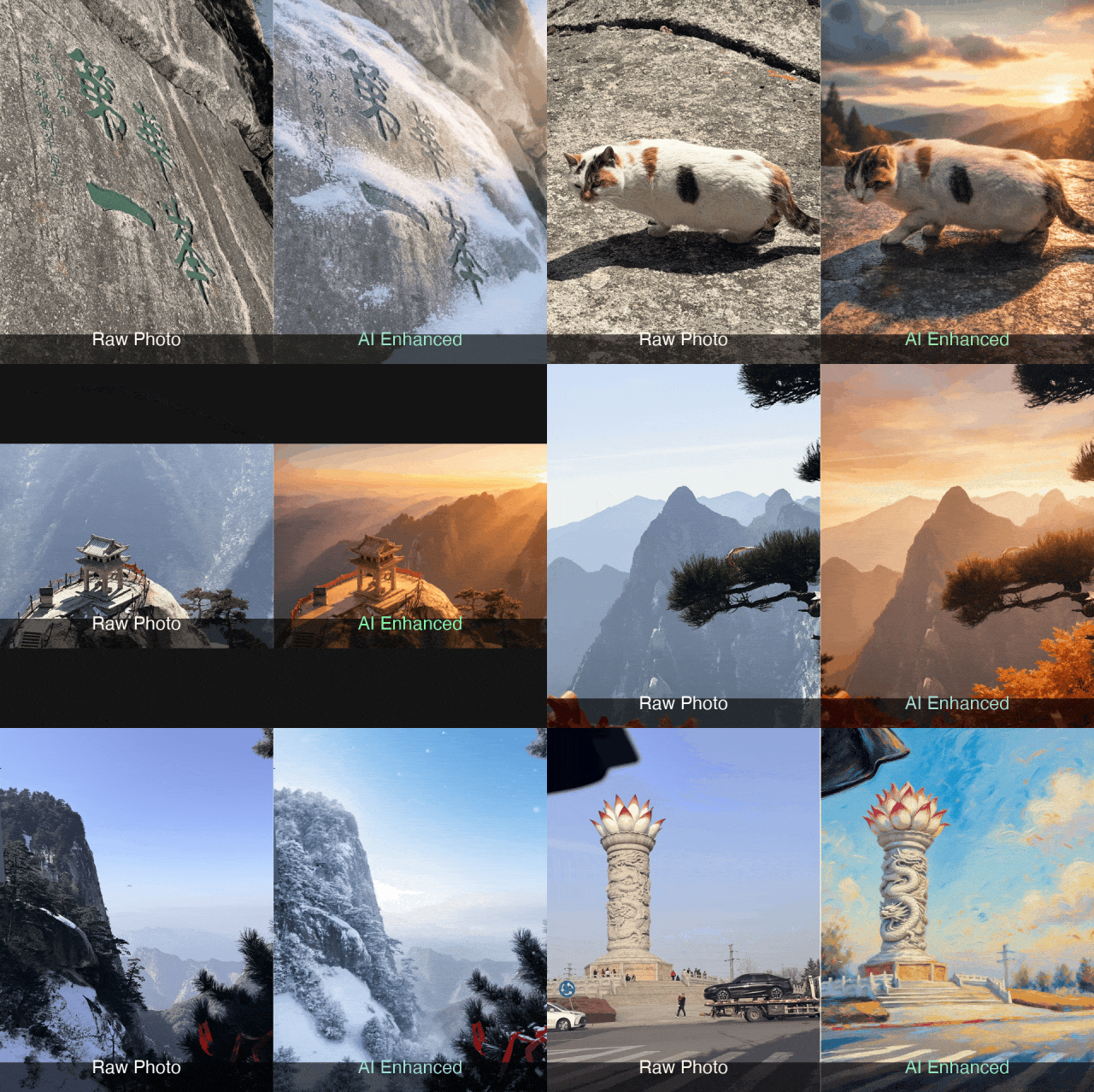
Day2: 西安城墙 & 西安博物院
Day3: 咸阳宫 & 陕历博秦汉馆
Day4: 唐乾陵
skill 代码已开源:https://github.com/forde450/agent-skills-report
欢迎通过以下方式下载、访问和使用 Ming-flash-omni-2.0。
🤗 Hugging Face:
https://huggingface.co/inclusionAI/Ming-flash-omni-2.0
🤖 ModelScope:
https://www.modelscope.cn/models/inclusionAI/Ming-flash-omni-2.0
📦 GitHub:
https://github.com/inclusionAI/Ming
🌐 Ling Studio:
https://chat.ant-ling.com/chat
⚙️ ZenMux: